Short answer
Use SVG or PDF for anything printed, because they are vector and stay sharp at any size. Use PNG for screens. Avoid JPG for QR codes entirely — its compression creates artefacts around the hard edges of modules, which is exactly the detail a scanner needs.
Vector versus raster, and why it matters here
A raster image is a fixed grid of pixels. Enlarge it and the pixels get bigger and blurrier. A vector image is a set of shapes described mathematically, so it renders crisply at any size.
For most images this is a quality preference. For QR codes it is closer to a functional requirement, because the thing a scanner reads is the sharp boundary between light and dark modules. Blur those boundaries and you are removing the signal itself.
This is why a code sent to a printer as an upscaled PNG so often disappoints. It looked fine at screen size and was enlarged past what its pixels could support.
The specific problem with JPG
JPG compression is designed for photographs. It discards detail the eye is unlikely to miss, and it is particularly aggressive around high-contrast edges — where it produces faint ringing artefacts.
A QR code is nothing but high-contrast edges. JPG puts its worst artefacts exactly where the scanner is looking, and it cannot store transparency either.
It will usually still scan at a generous size and high quality setting. It is simply the wrong tool, with no advantage over PNG to compensate.
Choosing
Match the format to where the code is going.
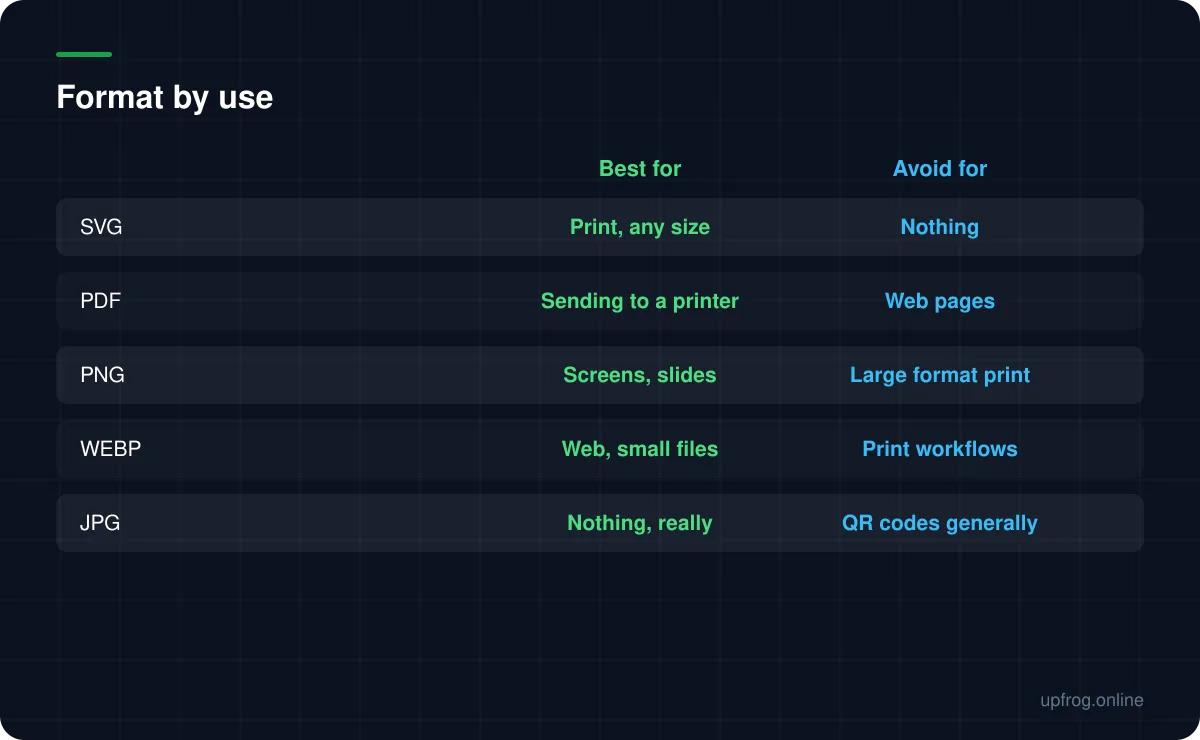
- SVG — anything printed, anything that might be resized later, anything handed to a designer. The safest default.
- PDF — when a printer asks for print-ready artwork, or the code is going into a document.
- PNG — websites, slides, emails, social posts. Supports transparency.
- WEBP — the same jobs as PNG at a smaller file size, where you know the destination supports it.
- JPG — only if something you cannot change refuses everything else.
Practical details
A few things that come up repeatedly once the format is chosen.
Transparency survives in PNG, WEBP and SVG. It does not survive in JPG, and our PDF export deliberately fills the background white so print behaviour is predictable.
If you are handing files to someone else, send the SVG even if they asked for a PNG. They can always rasterise it; they cannot recover detail from a raster you send them.
- 1
Decide print or screen first
That single question eliminates most of the options.
- 2
For print, export SVG or PDF
Then stop worrying about size entirely.
- 3
For screen, export PNG at the size you will display
Or a little larger for high-density displays.
- 4
Archive the SVG regardless
It is the master. Everything else can be regenerated from it.
Frequently asked questions
- What format should I use for a printed QR code?
- SVG or PDF. Both are vector, so the code stays perfectly sharp at any size and the printer is never enlarging fixed pixels.
- Can I use a JPG for a QR code?
- It will often work, but it is the worst choice available. JPG compression creates artefacts around exactly the hard edges a scanner reads, and it cannot store transparency. PNG is better in every respect.
- Which formats keep a transparent background?
- PNG, WEBP and SVG. JPG has no transparency support, and our PDF export fills the background white deliberately so that print output is predictable.
Sources
Specifications and primary documentation referenced above.