
Short answer
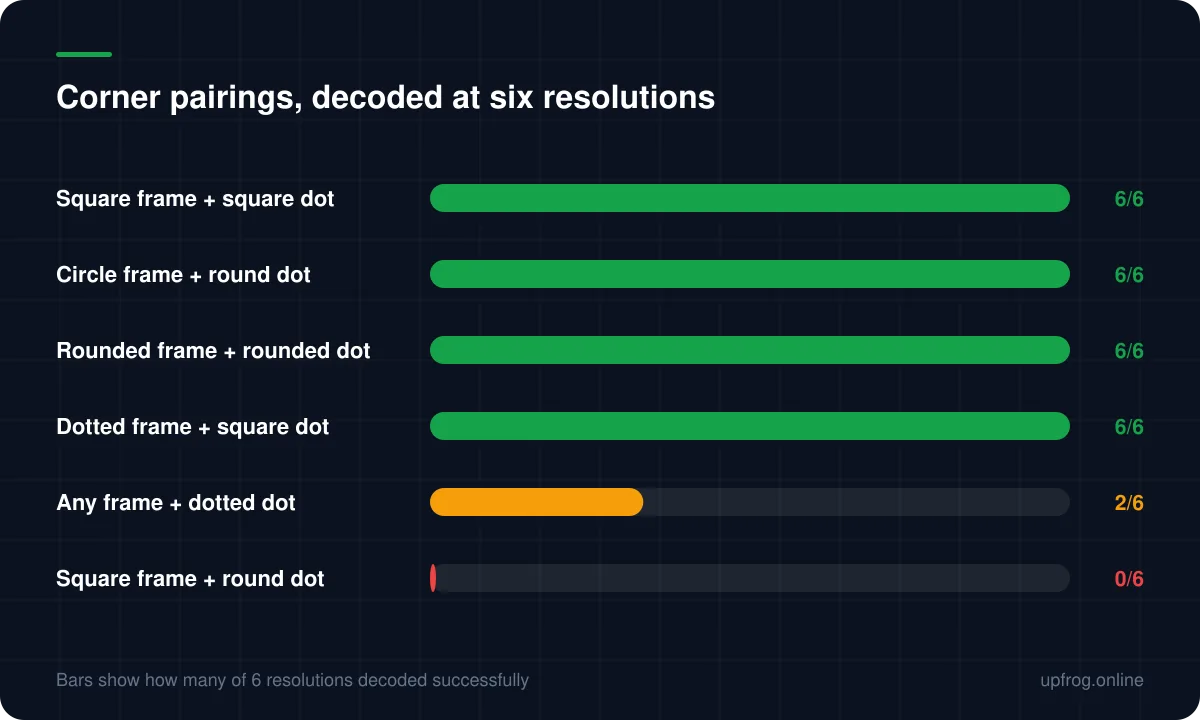
The three corner patterns are how a decoder finds a code at all, so restyling them carries more risk than restyling the body. In our testing, five frame and dot combinations failed at every resolution — most notably a round corner dot inside a sharp square frame.
What the corner patterns do
The three large squares in the corners are not decoration and they are not data. They are how a decoder finds the code in a camera frame at all.
A decoder scans lines across the image looking for a very specific sequence of dark and light runs — the proportions of those concentric squares. Once it finds three of them, it knows where the code is, how big it is and how it is rotated, and only then does it start reading data.
This is why they deserve more caution than the body. Break the module shapes and you lose some reliability. Break the corner proportions and the code is never located, so error correction never gets a chance to help.
What we measured
We rendered all 36 combinations of six corner frame shapes and six corner dot shapes, then decoded each at six different raster resolutions with an independent decoder.
Most combinations passed all six. Five failed all six — not marginally, not at certain sizes, but never. Every combination using a dotted corner dot was unreliable, passing only some resolutions.
The clearest example is a square corner frame with a round dot inside it. It looks entirely reasonable, and it decoded zero times out of six while the plain all-square control passed six out of six in the same run.
What is safe
Plenty, which is the good news. Corner restyling is worth doing — it is one of the highest-impact visual changes available.
- Keep the frame and the dot stylistically consistent: sharp with sharp, round with round.
- Circular frames with round dots work reliably and look distinctly modern.
- Rounded and extra-rounded frames tolerate a range of dot shapes.
- Colouring the corners differently from the body is completely safe and adds character at no cost.
The warning built into the generator
Because these results were surprising even to us, the measured table drives a live warning in the design panel rather than sitting in an article nobody reads at the right moment.
Pick a combination that failed every test and the editor tells you it will not scan and why. Pick one that was merely inconsistent and it tells you to test on a real device before relying on it.
That is the difference between publishing a finding and acting on it. The table in `scan-risk.ts` is the same data this article describes.
- 1
Style the body first
Module shape and colour, with the contrast reading in view.
- 2
Match the corner dot to the frame
Consistency of sharpness is the rule that avoids every measured failure.
- 3
Heed the warning if one appears
It reflects codes that genuinely did not decode, not a stylistic opinion.
- 4
Decode the result before shipping it
Especially if you have combined corner restyling with a logo or a gradient.
Frequently asked questions
- Can I change the corner shapes of a QR code?
- Yes, and it is one of the most effective ways to make a code look designed. The rule is to keep the frame and the dot stylistically consistent — a round dot belongs in a round frame, not a sharp square one.
- Why does my code stop scanning when I restyle the corners?
- Decoders locate a code by looking for a specific ratio of dark and light runs through the corner patterns. Some shape combinations distort that ratio enough that the code is never found, and error correction cannot help with data the decoder has not located.
- Are dotted corner patterns safe?
- Not reliably. In our testing every combination using a dotted corner dot decoded at only some resolutions. They are worth avoiding for anything printed.
Sources
Specifications and primary documentation referenced above.