
Short answer
Generate programmatically through an API, keep payloads short and consistent, and verify by decoding every generated image back to text and comparing it byte-for-byte against the intended value. Visual spot-checking does not scale and misses systematic errors.
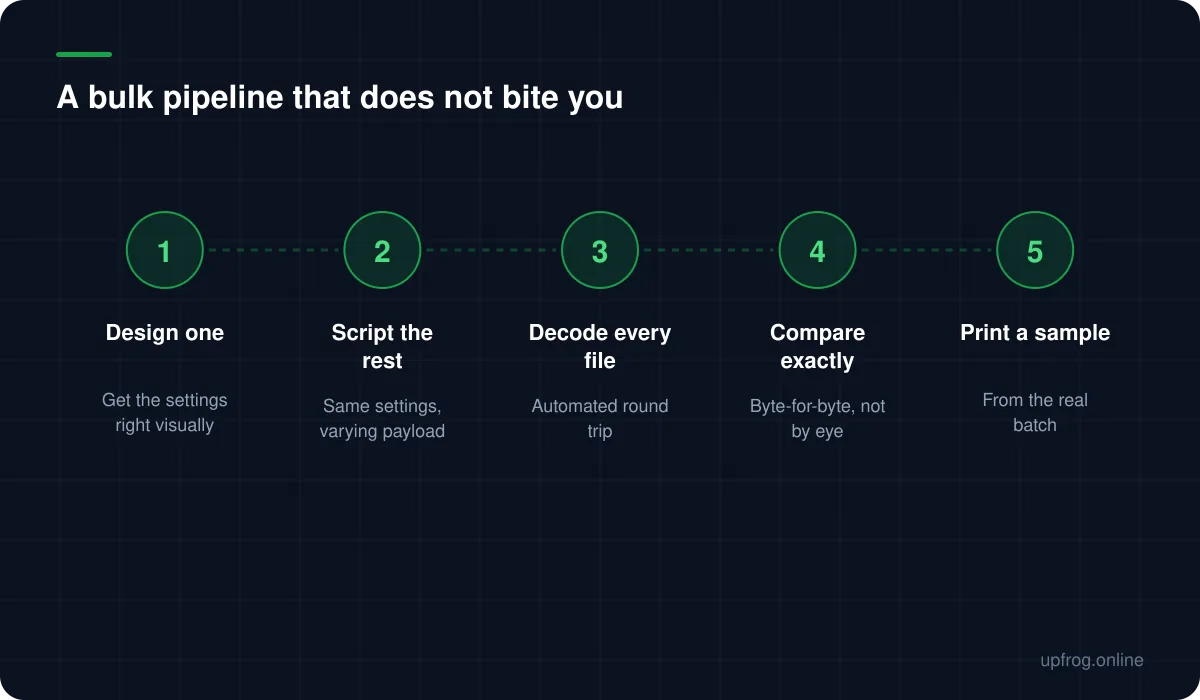
Design one code, then script the rest
The most reliable bulk workflow starts in the visual editor, not in code. Build a single representative code, get the colours, shapes and error correction right, and confirm it decodes comfortably at the size you will print.
Only then move to the API, holding every design parameter constant and varying only the payload. This keeps the visual decisions where you can see them and the repetition where a machine belongs.
It also means that if the batch has a problem, you already know it is not the design.
Keep payloads short and uniform
Bulk payloads tend to grow: an ID, plus a URL, plus a campaign parameter, plus a signature. Each addition pushes the code to a higher version with smaller modules.
There is a second, subtler problem. If payload lengths vary across the batch, the codes will not all be the same version, so their module counts differ. Print them at identical physical size and some will have noticeably smaller modules than others — meaning part of your batch is less reliable than the sample you tested.
Padding identifiers to a fixed length keeps the whole batch on the same version and behaving identically.
Verify by round-tripping, not by looking
This is the part most bulk workflows skip, and it is the only one that catches the failures that matter.
Visual inspection tells you a code exists. It does not tell you the code contains what you intended. An off-by-one in a loop produces a thousand perfectly valid codes all pointing at the wrong records, and every one of them looks correct.
The fix is automated: render each code, decode the image back to text with a decoder, and compare the result to the intended payload character by character. Anything that does not match exactly is a failure.
This is how we verify our own generator. All 19 content types are encoded, rendered, decoded and compared byte-for-byte on every change — which is how we know the awkward cases still work, like the CRLF line endings vCard requires and the escaping a Wi-Fi password needs.
Using the API
Our endpoint takes the same options as the visual editor and returns SVG. A GET request with query parameters covers most bulk work; POST with a JSON body handles longer payloads and logos.
It is free and needs no key, on a fair-use basis. For a large batch, generate once and store the results rather than requesting the same code repeatedly — the output is deterministic, so identical parameters always produce an identical file.
If you depend on this in production, self-hosting the application is a sensible precaution against us rate-limiting or changing something.
- 1
Fix the design parameters
From the code you already validated visually.
- 2
Generate with only the payload varying
Pad identifiers to a constant length so every code lands on the same version.
- 3
Decode every output and compare
Automatically, byte-for-byte, with any mismatch failing the build.
- 4
Print a physical sample from the real batch
Not from your test file. Confirm at final size on the final material.
Frequently asked questions
- How do I generate hundreds of QR codes at once?
- Design one code visually to fix the settings, then script the rest through an API holding those settings constant and varying only the payload. Store the output rather than regenerating on demand, since identical parameters produce identical files.
- How do I check a large batch of QR codes is correct?
- Decode every generated image back to text and compare it byte-for-byte against the intended payload. Visual inspection cannot catch a systematic error like an off-by-one that produces valid codes pointing at the wrong records.
- Should all codes in a batch be the same size?
- Ideally the same version, not just the same physical size. If payload lengths vary, module counts vary, and printing everything at one size leaves some codes with much smaller modules. Pad identifiers to a fixed length to avoid it.
Sources
Specifications and primary documentation referenced above.