Short answer
QR codes cost nothing to produce, work on every phone with a camera, and can be read from a distance. NFC tags need no aiming and feel more premium, but cost money per unit and are unreliable on some devices. For most printed use, QR wins on cost and reach.
The honest comparison
These get presented as rivals more often than they should be. They overlap, but their constraints are so different that the right choice is usually obvious once you name the constraint that binds.
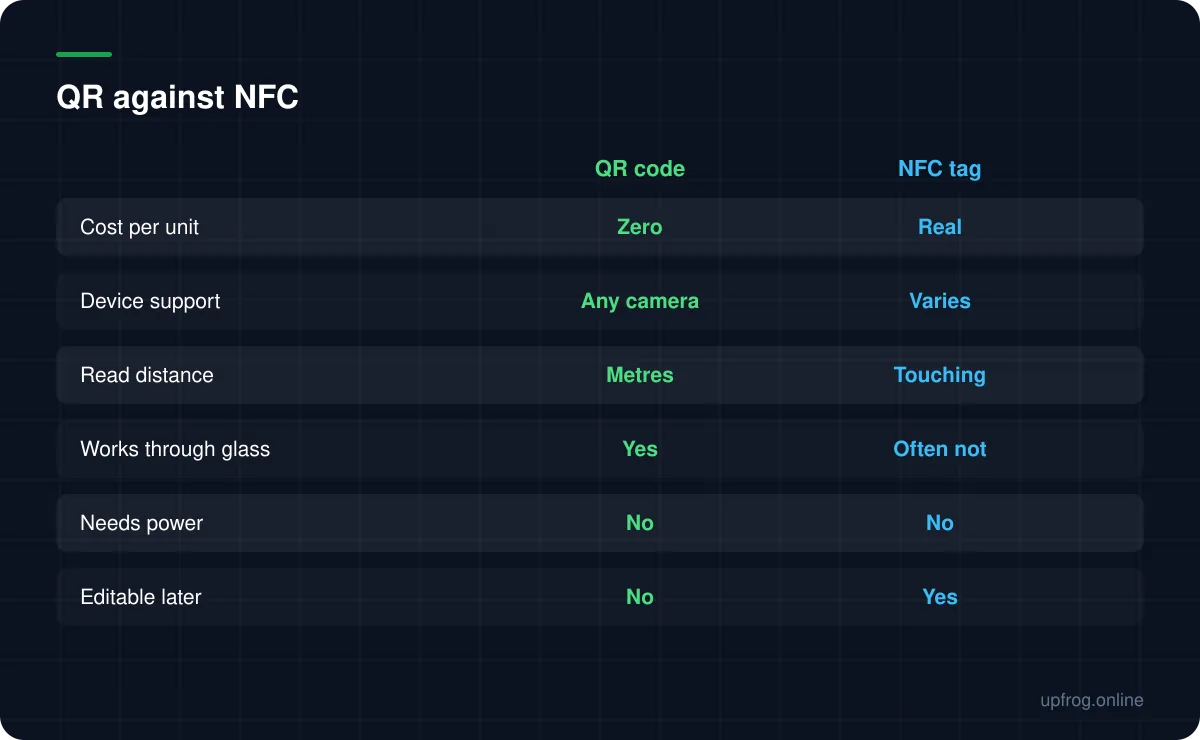
A QR code is ink. It costs nothing beyond the printing you were doing anyway, works at any scale from a sticker to a billboard, and can be read from across a room.
An NFC tag is a physical chip. It costs money for every single unit, must be touched to be read, and cannot be scanned from a poster across a street.
Where NFC is genuinely better
There are real cases, and they cluster around interaction quality rather than reach.
- A tap feels more premium than aiming a camera — worth something on packaging for expensive products.
- No aiming, no focusing, no lighting requirement, which helps in dark venues.
- The destination can be rewritten later on a rewritable tag, without reprinting anything.
- It works for people who struggle to frame a camera shot steadily.
Where NFC quietly fails
The support story is less uniform than marketing suggests. Reading behaviour varies by device and operating system version, some phones require the screen to be unlocked and the tag positioned over a specific part of the handset, and metal or liquid behind a tag detunes it.
A tag behind shop glass usually cannot be read at all, because the interaction requires near-contact. A QR code behind the same glass works fine.
And there is a discovery problem: a customer can see a QR code and understand what to do. An NFC tag is invisible unless labelled — at which point you have printed something anyway.
Cost at volume
This is usually the deciding factor and it is worth being concrete about the shape of it, even without quoting prices that will date.
A QR code has zero marginal cost. Printing ten thousand costs the same as printing ten, because it is part of the artwork.
NFC tags have a per-unit cost that scales linearly and never disappears. At ten units that is irrelevant. At ten thousand it is a budget line, and it recurs with every production run.
Choosing
Three questions settle it in most cases.
- 1
Will people be touching the item?
If not — a poster, a window, a menu across a table — NFC is out immediately.
- 2
Does the per-unit cost survive your volume?
If you are producing thousands, this usually decides it on its own.
- 3
Is the tap experience worth paying for?
On a premium product, sometimes genuinely yes. On a takeaway menu, no.
- 4
If NFC wins, print a code beside it anyway
Coverage for unsupported devices, and a fallback when the tag fails.
Frequently asked questions
- Is NFC better than a QR code?
- Better at close-range interaction quality, worse at cost, reach and universality. NFC must be touched and costs money per unit; a QR code is free to produce and readable from metres away by any camera phone.
- Do all phones support NFC tag reading?
- Most modern phones have the hardware, but behaviour varies by model and OS version, and some require the screen unlocked and the tag over a specific spot. A camera, by contrast, is universal.
- Can I use both on the same product?
- Yes, and on premium packaging it is often the right call. The tag provides the nicer interaction, the printed code guarantees everyone can reach the content and acts as a fallback if the tag is damaged.
Sources
Specifications and primary documentation referenced above.