
Short answer
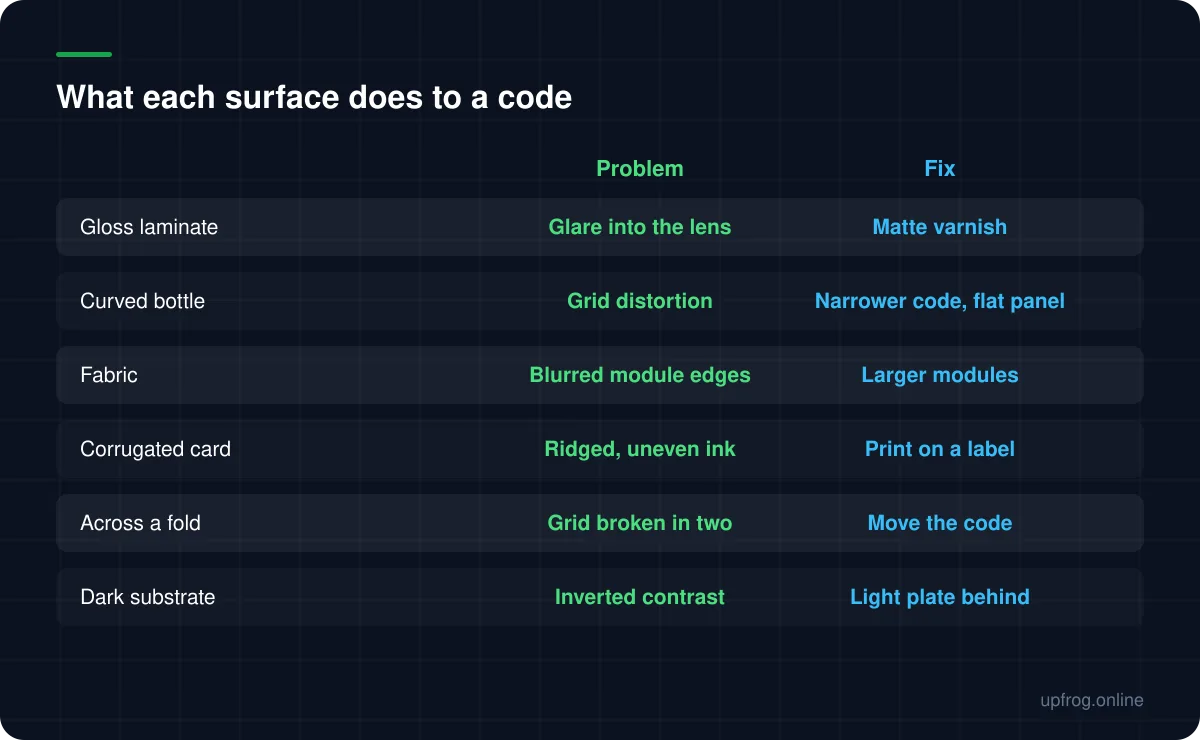
Gloss reflects the phone's own light back into the lens, curves distort the grid, and fabric blurs module edges. Matte finishes, flatter placement and larger modules solve most of it. A code across a fold or seam is usually unrecoverable.
Gloss is the most common one
A glossy laminate is a mirror. When someone scans in a shop or a restaurant, the phone's own screen and the ceiling lights reflect off that surface and straight back into the camera, and the reflection lands as a bright patch across part of the code.
The frustrating part is that it is intermittent. The same code scans instantly at one angle and not at all at another, which makes it look like a code problem rather than a finishing problem.
A matte or satin finish over the code area solves it outright. Many printers will spot-matte a region while keeping the rest of the piece glossy.
Curves
A decoder assumes a flat, square grid. Wrapping a code around a bottle or a jar bends the rows, and past a certain curvature the decoder cannot square it up again.
Two things help. Keep the code physically narrow relative to the diameter, so less curvature falls across it. And place it on the flattest available panel — most containers have one, even if it is small.
Very small diameters, like a lip balm tube or a cable, are effectively hopeless for a wrapped code. Use a flat tag or a label with a flag fold instead.
Absorbent and textured materials
Fabric, corrugated card, kraft paper and unfinished wood all blur the boundary between adjacent modules. Ink spreads into the material, dark modules grow slightly, light gaps shrink, and at small module sizes adjacent modules start merging together.
The fix is module size rather than error correction. Print the code larger, keep the payload short, and avoid dotted or thin module shapes which have less margin to lose.
Folds, seams and edges
A code crossing a fold is broken in a way nothing can fix. The two halves sit on different planes, and no amount of redundancy reconstructs a grid that is physically bent in the middle.
The same applies to seams between two materials, the gap in a shrink wrap, and the trim edge of a printed piece. Give the code its own flat, continuous area with margin to spare.
Dark and metallic substrates
Dark packaging tempts people to invert the code — light modules on a dark background. Some scanners handle inversion and many do not, so it is a genuine gamble.
The reliable approach is a light plate behind a normal dark-on-light code. If the design cannot accommodate a white rectangle, our Midnight template is built for this case: a dark plate with a luminous foreground, tested to decode at every resolution we check.
Metallic and foil substrates combine the gloss problem with an uneven reflection, and are best avoided under a code entirely.
- 1
Choose the flattest, most matte area available
Before anything else. Placement solves more than settings do.
- 2
Size up and shorten the payload
Bigger modules survive ink spread, glare and curvature better than more redundancy does.
- 3
Ask for a spot matte finish over the code
Cheap, and eliminates the most common failure on printed packaging.
- 4
Test on the real material, at an angle, under real lighting
Glare only shows up when you reproduce the conditions that cause it.
Frequently asked questions
- Why does my QR code only scan from certain angles?
- That is almost always glare from a glossy finish. The phone's own light reflects back into the lens and washes out part of the code. A matte finish over the code area fixes it.
- Can a QR code go on a curved bottle?
- Yes, if the code is narrow relative to the bottle's diameter and sits on the flattest panel available. On very small diameters, use a flat tag or a flag-fold label instead of wrapping.
- Can I print a QR code on fabric?
- Yes, but print it noticeably larger than you would on paper and keep the payload short. Fabric blurs module edges, so the protection you need is bigger modules, not higher error correction.
- Should I invert a QR code for dark packaging?
- Prefer not to. Inversion support varies between scanners. A light plate behind a normal code is more reliable, or use a design tested specifically for dark backgrounds.
Sources
Specifications and primary documentation referenced above.